
DTF colour management
Colour is the reason a job gets sent back. The RIP's colour suite puts profiling, curves and verification of the printed result in one place.
What ΔE < 2.0 means
ΔE is the distance between two colours measured the way the eye perceives it. Below 2 the difference is small enough that you need them side by side to notice; above 5 anybody sees it.
That is the target of the colour workflow: keeping the customer's brand colour and the printed result inside that margin. And to know whether you are, you measure — you do not look.
Spectrophotometer profiling
The wizard generates the chart, reads it with the spectrophotometer and builds the machine's ICC profile, with a ΔE quality report at the end.
It works with the X-Rite i1Pro 2 in strip mode, and also lets you measure single patches to check one colour against its target value.
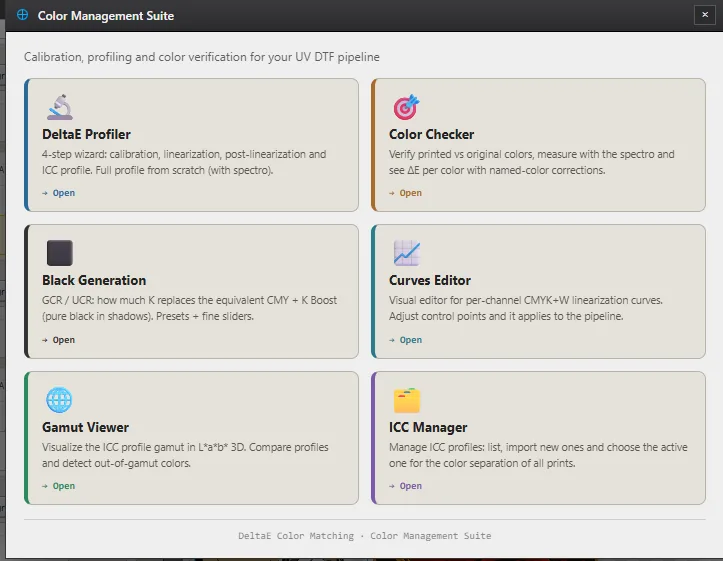
The six colour tools
DeltaE Profiler
Four-step profiling wizard: chart, print, read and ICC, with a ΔE report.
Color Checker
Compares the printed colour with the target — including spot colours and Pantone-style references — and gives the ΔE of each, colour-coded.
Black Generation
GCR and black boost control, which is what gives depth to shadows and cleanliness to neutrals.
Curves editor
A per-channel curve on top of linearisation, to fix one tone without rebuilding the profile.
Gamut viewer
The cloud of colour your machine can reproduce, in three dimensions, so you know which colour will not make it.
ICC manager
Import, list and activate profiles per machine, without copying files around by hand.
The input profile counts too
A common failure that is hard to spot: if the RIP assumes everything coming in is sRGB, an Adobe RGB file loses precisely the most saturated greens and cyans — where it shows most.
That is why the colour path is colorimetric end to end, from the input profile through to the printer's space.
Frequently asked questions
Do I need a spectrophotometer?
To profile your own machine, yes. Sapiens CoreFlow RIP ships with starting profiles and works with them, but every machine, ink and film behaves differently: your own profile, measured with a spectrophotometer, is what brings ΔE below 2.0.
Will my i1Pro 2 work?
Yes. The i1Pro 2 is the spectrophotometer Sapiens CoreFlow RIP is integrated with, both for single patches and for full charts in strip mode, from the profiling wizard.
Can I use an ICC profile I already have?
Yes. Import it from the ICC manager in Sapiens CoreFlow RIP and activate it per machine profile, so you can keep a different ICC for each printer, ink or film without redoing anything.
Can I fix a single colour without rebuilding the profile?
Yes, that is what the curves editor in Sapiens CoreFlow RIP is for: it acts per channel and on top of linearisation, so you adjust one specific colour without touching the profile or re-reading the chart.
Will the colour match if a customer repeats the order in six months?
Yes, as long as the profile has not changed. Sapiens CoreFlow RIP stores the colour profile and the settings alongside the project, so reopening a job from months ago reproduces the same separation. What is worth checking is the machine: ink, film and printhead change with use, and that is what ΔE verification is for.
How do I avoid reprints caused by colour?
By measuring before you run. Repeatability in Sapiens CoreFlow RIP comes from three things: your own ICC profile for your machine, per-channel linearisation, and preflight, which warns about excess ink or out-of-gamut colour on the real pixels before the PRN is generated. A reprint costs film, ink and the rest of the shift.