
DTF RIP software
Sapiens CoreFlow RIP is DeltaE Color Matching's RIP software for DTF production. From the customer's file to a PRN ready for the printer, without leaving the program.
What a RIP does in a DTF shop
A DTF printer does not understand a JPG or a PDF. The RIP is the program that turns that file into something the print head can actually print: how much of each ink lands on every dot, where the backing white goes and in what order the passes are laid down.
Two things that cost real money in a shop depend on that translation: whether the printed colour matches the screen, and whether you waste metres of film.
- Colour management — input and printer ICC profiles, so printed colour matches the design.
- Channel separation — RGB to CMYK plus white, with black generation and ink limiting.
- Halftoning — dot placement so gradients do not band.
- Layout — nesting the pieces across the width of your roll.
- PRN writing — the native file your printer's board reads.
Automatic white and channel separation
In DTF mode the white is derived from the artwork itself: where there is colour there is backing, and where the file is transparent no ink is laid. You do not need to prepare a separate white layer in Photoshop.
Separation is where the years of work sit: black generation, total ink limit, dot gain compensation and zoned hue control, so neutrals do not drift and shadows do not block up.
Up to 12 channels and special inks
Sapiens CoreFlow RIP writes up to 12 channels into the PRN, in your machine's physical order. Besides CMYK and white, each channel can carry a special ink: orange, red, green, blue, the four fluorescents and a second white. A channel can also be left switched off without moving the ones after it.
Special inks are assigned by area, just like white: you mark in the editor which part of the design goes in fluorescent orange or a brand red and the RIP sends it to its channel. It is not an automatic extended gamut: you decide where each ink goes.
- White 2 with mirroring — for machines with two white heads: the second one gets exactly the same white as the first.
- Free order — any ink on any channel, with the colour order chart to check it on the machine.
- In textile DTF — UV DTF 3D keeps white and varnish.
Automatic gang sheet and nesting
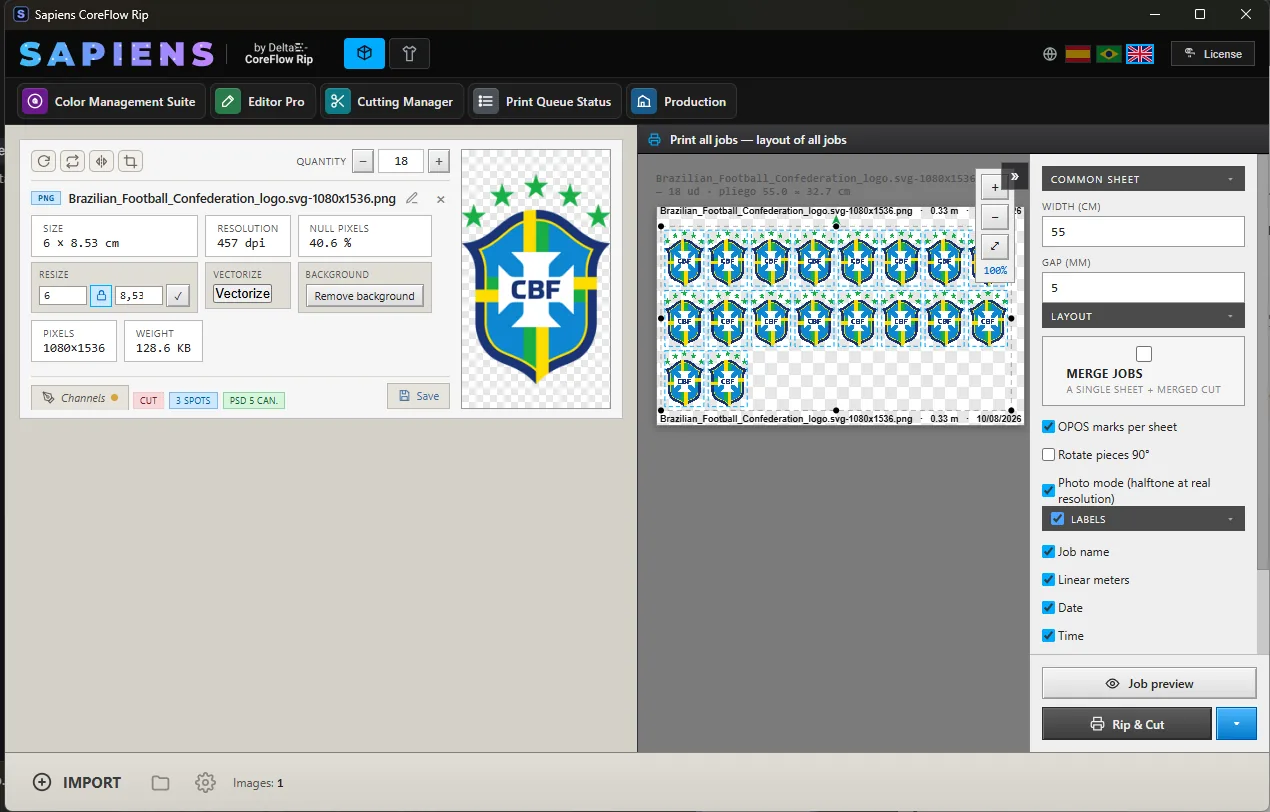
You add the copies and the RIP does the rest. The automatic gang sheet builds the layout for you: auto-crop trims the empty pixels from each design so the pieces sit as close together as possible, and automatic nesting lays them out across whatever roll width you run, with the spacing you set and the registration marks for the cutter. Less gap between pieces means less film waste, which is where the money goes in a DTF shop.
The sheet is auto-expanding: it grows on its own as you build the layout, with no need to set the length in advance, and what you see on screen is what comes out. Long sheets are processed in bands, so a job several metres long does not depend on how much memory the computer has, and the queue shows every job with its time, its name and its progress.
It works the same in both modes: the same automatic gang sheet builds a textile DTF layout and a UV DTF 3D one.
Production, editing and cost control
UV DTF 3D
White and varnish by area, textures and relief, with a three-dimensional preview before you print.
See 3D mode →Print & cut
Bleed, contour cut line and a cut file with registration marks for the cutter.
See print & cut →Colour management
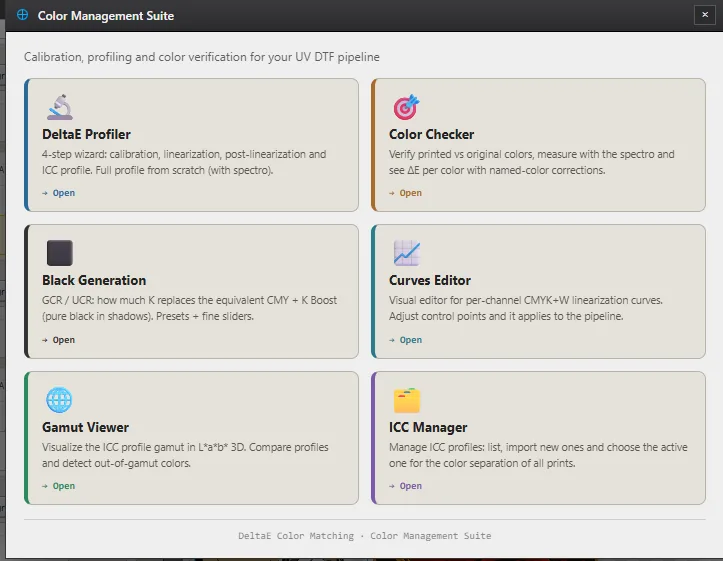
Spectrophotometer profiling, per-channel curves, gamut viewer and ΔE verification.
See the colour suite →Production Center
Cost per job, revenue and profit, ink cost and consumption by colour, and PDF reports by period.
Editor tools
Editor Pro, Sapiens PhotoPro and Sapiens VectorPro inside the RIP: colour and cleanup, image retouching with its spots, and vector, without leaving the program.
See built-in editing →Print queue
Live status of every job, with pause and cancel, plus the history of what has been processed.
Specifications
| Boards | BYHX · HOSON |
|---|---|
| Print heads | Epson I3200-A1/U1 |
| Roland | Driver included as standard · validated on VersaUV LG-640 |
| In integration | Epson · Mimaki — already printing · driver in integration |
| Resolution | 720 × 1800 · 720 × 2400 dpi |
| Passes | 6 or 8 as standard · configurable per profile |
| Advanced driverless settings | Custom resolutions per device, to match the printhead |
| Channels | Up to 12 · CMYK, white, varnish and specials (orange, red, green, blue, fluorescent, white 2) |
| Colour depth | 16-bit internal processing · 8-bit output to the hardware |
| Layout | Automatic gang sheet · auto-crop · nesting · auto-expanding sheet |
| Built-in editing | Editor Pro · Sapiens PhotoPro · Sapiens VectorPro, included |
| Output | Native PRN · SVG and PLT for cutting |
| Input | PNG, JPG, TIFF, PSD, PDF, AI, EPS, SVG |
| System | Windows 10 and 11 (64-bit) · macOS in development |
| Requirements | Intel Core i5 or better · 8 GB RAM (16 recommended) · 40 GB free disk space |
| Languages | Spanish · English · Portuguese |
| Licence | Perpetual, per machine, transferable |
| Version | 26 |
Frequently asked questions
Will it work with my DTF printer?
If your machine uses a BYHX or HOSON board with Epson I3200-A1/U1 heads, yes: Sapiens CoreFlow RIP writes the native PRN for both boards. That is the hardware in most 30, 40 and 60 cm DTF printers, and configurations from 1 up to 12 printheads are supported. If it is a Roland, the driver is included as standard, validated on the VersaUV LG-640. And if it is an Epson or Mimaki, Sapiens already prints on them with the driver in integration, open project by project. If you are not sure which board you have, send us the model and we will check.
How is it different from CoreFlow RIP?
Sapiens CoreFlow RIP is the evolution of DeltaE CoreFlow RIP: the same product, under its current name. It keeps CoreFlow's colour engine, which is what was proven in production, and adds UV DTF 3D mode, cut management, the job queue and the production centre. It is not a different program: it is the next version.
Is there a monthly fee?
No. Sapiens CoreFlow RIP is sold as a perpetual licence from €800: you pay once and the software never expires. The annual update pack is optional and only affects receiving new versions, not your ability to keep working.
What computer do I need?
An Intel Core i5 processor or better, 8 GB of RAM —16 is better— and 40 GB of free disk space. Sapiens CoreFlow RIP rasterises locally, so disk is what you notice most: a 20-metre sheet takes around 33 GB while it is being generated. More memory speeds the work up, but it does not change the colour.
Can I move it to another computer?
Yes. A Sapiens CoreFlow RIP licence is tied to one computer, but you deactivate it from the program itself on the old machine, which frees the seat, and activate it on the new one. You do not need to ask us or wait: you do it yourself from the licence manager.
What languages does it come in?
Sapiens CoreFlow RIP is available in Spanish, English and Portuguese, and so is the user manual. On first run it starts in the language of the system, falling back to English, and you can change it at any time from the flags.