
DTF print & cut
Contour cutting is decided in the same place the print is prepared, so the cut line and the printed sheet come from one layout and line up.
Bleed and cut line
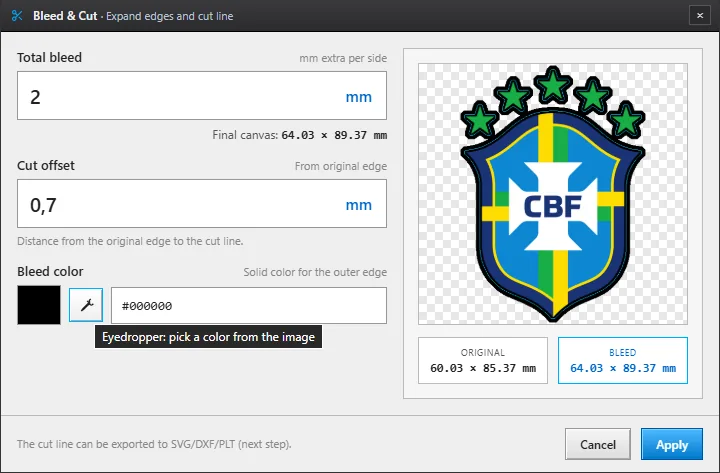
Bleed is generated from the real silhouette of the artwork, in the colour and the millimetres you choose, and the cut line is drawn at the distance you set from the original edge.
That detail matters more than it sounds: if the contour is computed on the already-bled image, the line ends up outside the bleed and the piece comes out with a white lip.
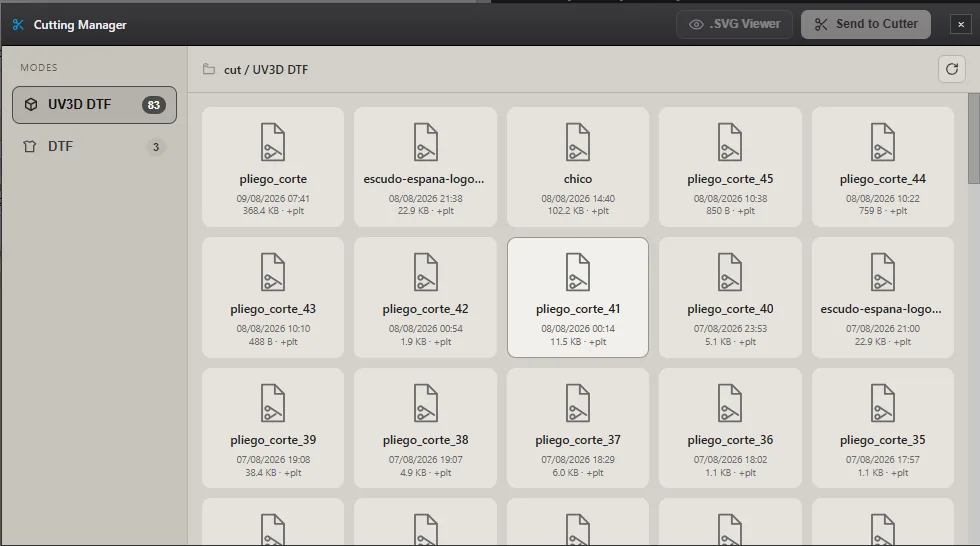
Cutting Manager
Every sheet produces its cut file, and the manager lists them by mode with a preview. From there you open the viewer, send it to the cutter or save a copy.
The file carries the registration marks and the orientation arrow in exactly the position they were printed, because both come from the same layout.
Editing the cut line
The automatic contour is right almost every time, but some pieces are worth touching up: an inner hole you do not want cut, a corner that should be sharp or a contour that needs a little more room. With Edit cut…, under Bleed and cut, the line becomes nodes and curves and you work it like a design pen tool.
- Add, delete and convert nodes — from curve to corner and back.
- Offset the contour — outwards or inwards, in millimetres.
- Delete a contour — so a hole or a loose piece is not cut.
- Freehand drawing — optional; it only appears if you turn it on, so it takes no screen space.
Output for the cutter
Cuts are saved as SVG, which any design program opens, and as PLT to send straight to the cutter. Registration marks sit on their own layer, apart from the contour, so they are never cut by mistake.
- SVG — contour and marks, with physical dimensions in millimetres.
- PLT — the file your cutter understands, with mark-based registration.
- Registration marks — at the corners and at the midpoints of the long sides, with an orientation arrow.
Frequently asked questions
Which cutters does it work with?
Output from Sapiens CoreFlow RIP is PLT with mark-based registration, the standard for contour cutters. It is integrated and tested with the Teneth workflow; for other models, validate mark alignment on a test before going into production.
Can I cut without printing?
Yes. Sapiens CoreFlow RIP generates the cut file whether or not you send the job to print, so you can prepare cutting on one side and printing on the other.
Do I have to trace the contour myself?
No. Sapiens CoreFlow RIP takes it from the transparency of the file: it detects the silhouette and traces the contour at the bleed distance you set. There is no need to prepare a cut path in a vector editor.
Can I touch up the cut line?
Yes. In Sapiens CoreFlow RIP, “Edit cut…” turns the contour into nodes and curves: you add and delete points, offset the contour in millimetres, delete a contour you do not want cut and, if you turn it on, draw freehand. The edited line goes into the same cut file.