
Compatible DTF printers
The RIP writes the native PRN of the machine's board. There is no layer in between, so compatibility is decided by the board, not by the name on the front. BYHX, HOSON and Roland are standard; on Epson and Mimaki we already print, with the drivers in integration.
What matters is the board
Most DTF printers sold today are built from common components: the same electronics and the same heads under different shells and names. So the useful question is not what brand the printer is, but which board is inside it.
Sapiens CoreFlow RIP writes the PRN file read by BYHX and HOSON boards with Epson I3200-A1/U1 heads — the most common combination in 30, 40 and 60 cm DTF printers.
Compatibility
| Boards | BYHX · HOSON |
|---|---|
| Print heads | Epson I3200-A1/U1 |
| Configurations | From 1 to 12 printheads |
| Roland | Driver included as standard · validated on VersaUV LG-640 |
| In integration | Epson · Mimaki — already printing |
| Common widths | 30 cm · 40 cm · 60 cm |
| Resolution | 720 × 1800 · 720 × 2400 dpi |
| Passes | 6 or 8 as standard · per machine profile |
| Advanced driverless settings | Custom resolutions per device, to match the printhead |
| Channels | CMYK + white + varnish |
| Output | Native PRN |
| System | Windows 10 and 11 (64-bit) · macOS in development |
Roland as standard; Epson and Mimaki in integration
Beyond BYHX and HOSON, Sapiens CoreFlow RIP already prints on machines from these three brands. Their drivers are in integration and not yet included as standard in the installer: we open them project by project to shops, distributors and manufacturers who want to validate them on their machine.
Roland
Validated on VersaUV LG-640: colour, white, varnish, layered relief and cut in the same job.
Driver included as standard
Epson
Machines with Epson electronics. Not to be confused with the I3200 head, already in production on BYHX and HOSON.
Already printing · driver in integration
Mimaki
The colour and layout engine is the same; what is being integrated is writing the file.
Already printing · driver in integration
Do you build or distribute printers?
We integrate Sapiens with your machine: driver, validation and delivery with your hardware.
OEM integration →See it printing
Sapiens CoreFlow RIP was born for HOSON and BYHX boards. This video shows it printing on other brands, in textile DTF and UV DTF, from the same program.

Sapiens CoreFlow RIP for macOS
The macOS version is in development. The colour engine and the rasterisation engine are already platform-independent, so the work is in the desktop application, not in the RIP itself.
The split will be the same one every shop already uses: you prepare and rasterise on the Mac, and the file goes to the machine that drives the printer. BYHX and HOSON boards are still driven from Windows, as with any RIP.
There is no public date yet: we will announce it when it has been tested. If you work on a Mac, leave us your email below and you will be among the first to know.
Tell me when the Mac version is out
We write once, on the day it is available. Nothing else.
Advanced driverless settings: your printhead sets the resolution
On BYHX, HOSON and Epson the file structure is the same from one model to the next; what changes is the resolution each printhead accepts. That is why Sapiens CoreFlow RIP does not make you wait for a new version for every machine and printhead combination.
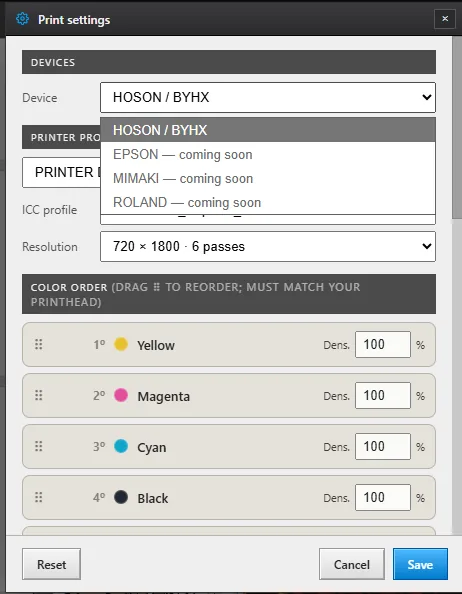
With Advanced driverless settings you define your own resolutions per device —X, Y and passes— and they are stored as a machine setting. So you do not have to type them in, it offers the printhead's known combinations as shortcuts, and you can enter any other value within range.
Settings per machine profile
Each machine is stored as a profile with its channel order, its per-channel density and its colour profile. If you run two different printers, each keeps its own configuration.
Channel order is re-orderable, because the physical order of the inks in the carriage is not the same on every machine — and getting it wrong is one of the classic reasons a colour comes out swapped.
Frequently asked questions
I do not know which board my machine has.
It is usually visible in the printing program that came with the printer, or on the board itself: as standard Sapiens CoreFlow RIP writes for BYHX, HOSON and Roland, and it already prints on Epson and Mimaki with the driver in integration. Send us a photo of the software screen or the inside of the machine and we will tell you whether it is compatible.
Does it work with Roland, Epson or Mimaki?
With Roland, yes, as standard: the driver ships in the installer and is validated on a VersaUV LG-640 with colour, white, varnish, relief and cut. On Epson and Mimaki it already prints, with the drivers in integration: they are opened project by project to anyone who wants to validate them on their machine.
What about UV DTF printers?
Yes. As standard, with a BYHX or HOSON board: in Sapiens CoreFlow RIP the varnish channel is the sixth channel of the PRN and is enabled per machine profile, alongside white. And on Roland UV printers it prints layered relief and cut, with the driver included as standard.
What if my printhead runs at a different resolution?
There is no need to wait for a new version. In Advanced driverless settings, Sapiens CoreFlow RIP lets you add your own resolutions per device —X, Y and passes— starting from the printhead's known combinations or entering your own. Only use the ones your machine accepts: a resolution outside that range prints badly or not at all.
Do I need a powerful computer?
For normal jobs, no: Sapiens CoreFlow RIP runs on Windows 10 and 11 without special hardware. For sheets several metres long more memory helps, though the process runs in bands precisely so it does not depend on it and can output long lengths.