
RIP software for Epson printers
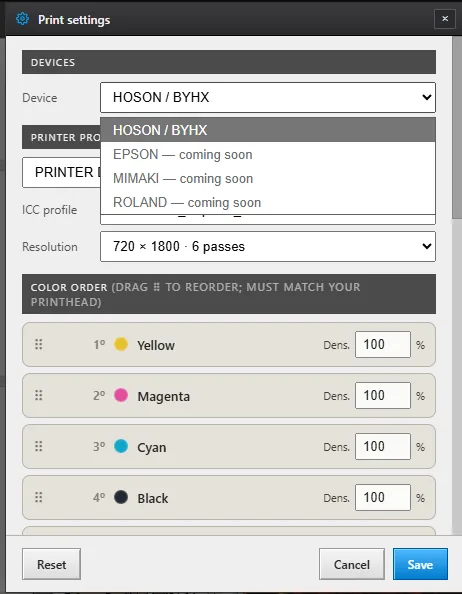
Sapiens CoreFlow RIP and Epson meet in two ways. The first has been in production for a long time: DTF printers with Epson I3200-A1/U1 heads and a BYHX or HOSON board. The second is new: the driver for the Epson SureColor SC-G6000 (DTF), with its own electronics, now ships as standard in the installer.
Epson head or Epson printer: not the same thing
It is the most common mix-up when someone searches for an Epson RIP. The vast majority of 30, 40 and 60 cm DTF printers use Epson printheads, but they are not Epson printers: the board that drives them is BYHX or HOSON, and that board decides which file the machine understands.
An Epson printer, on the other hand, has Epson's electronics and its own file format. They are two different routes, and today both are standard:
What works with Epson today
| DTF with Epson I3200-A1/U1 head + BYHX or HOSON board | In production · native PRN as standard |
|---|---|
| Printhead configurations | From 1 to 12 |
| Epson SureColor SC-G6000 (DTF) | Driver included as standard · its three print modes |
| Other Epson models | Project by project, on request |
How to tell which one you have
Look at the program you print with today. If it is the board's print manager —BYHX's Print Manager or HOSON's— you have a DTF printer with an Epson head, and Sapiens CoreFlow RIP already writes its native file as standard.
If the machine is an Epson SureColor SC-G6000, its driver ships as standard in the installer; if it is another Epson model, it goes project by project. Either way, the quickest thing is to send us the model and a photo of the software screen: we will tell you where it stands.
The same on any Epson
Everything the RIP does before writing the file is the same for both routes:
Automatic white
The backing white is calculated from the image itself, with no separate layer to prepare.
See the DTF RIP →Colour management
ICC profile, per-channel curves and ΔE verification of the print.
See the colour suite →UV DTF 3D
White and varnish by area, textures and a three-dimensional preview.
See 3D mode →Do you distribute Epson? We build the driver to order
If you sell Epson machines and your customers need a RIP, we develop a custom driver for the models you distribute: we start from real files the machine already prints well, validate it with you on the printer, and your customers get it ready in the installer.
Tell us which models you sell and in which market on the integration page for distributors and manufacturers.
Frequently asked questions
Does Sapiens CoreFlow RIP work with my DTF printer with an Epson I3200 head?
Yes, if the board is BYHX or HOSON: Sapiens CoreFlow RIP writes its native PRN as standard, with Epson I3200-A1/U1 heads in configurations from 1 to 12. That is the hardware in most 30, 40 and 60 cm DTF printers, and it is in real production.
What about an Epson-branded printer?
Yes, with the Epson SureColor SC-G6000 (DTF): its driver ships as standard in the Sapiens CoreFlow RIP installer, with its three print modes. For other Epson models it is opened project by project: write to us with the model and we will look at it.
What do you need to try my Epson model?
The exact model, a file your machine already prints well with its own software, and a photo of that print. Sapiens CoreFlow RIP is integrated starting from real machine files, not assumptions, so the first test is already compared with something that works.
Do I have to stop using Epson's software?
Not to get started. Sapiens CoreFlow RIP prepares the job —colour, white, sheet layout— and writes the file; the machine's software can stay installed for maintenance and its own settings.